If you have recently shopped for a new Chamberlain or LiftMaster garage door opener, you might have noticed a new term: Security+ 3.0. While “new and improved” usually sounds good, this latest update has thrown a wrench into the smart home community. Here is a breakdown of what is going on, why your existing gadgets might not work, and how we can help you get OpenGarage running on these new units.
What is Security+ 3.0?
Released in November 2025, Security+ 3.0 is the latest encryption protocol from Chamberlain Group (which owns Chamberlain, LiftMaster, and Craftsman).
- How to spot it: These openers feature a White Learn Button (previous generations used Yellow, Purple, or Red/Orange). Some example models are: Chamberlain D1000, LiftMaster 2220L.
- The Big Change: Unlike previous versions that communicated via wired data lines, Security+ 3.0 moves accessory communication to encrypted Bluetooth Low Energy (BLE). The wall button wires now provide only power, with no data signal to tap into.
- The remote and wall button that come with these systems look like the images below.
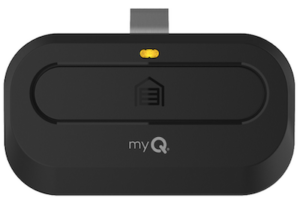
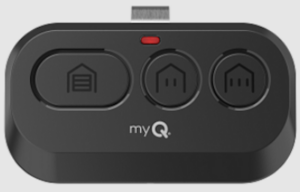
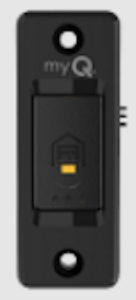
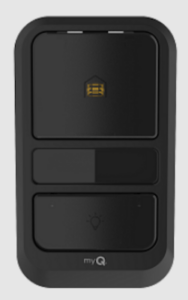
The Problem: The “Closed” Ecosystem
Because the new protocol relies on encrypted wireless communication, no third-party gadgets currently support it natively. RatGDO, Konnected, Tailwind, you name it, none supports it.
- Devices that worked on Security+ 2.0 (like RATGDO) generally cannot control these new units directly.
- Chamberlain has aggressively moved toward a closed “myQ” ecosystem, locking out local control integration in favor of their cloud subscription model.
- The Bottom Line: It is unlikely that native third-party support will arrive anytime soon.
The Solution: The “Sacrifice Remote” Method
If you have a Security+ 3.0 opener and want to use OpenGarage (or any third-party/open-source controller), there is a reliable workaround. It is the same trick we used for Security+ 2.0 before our native support arrived: Switching the button on a dedicated remote.
Instead of wiring OpenGarage to the motor unit directly, you wire it to a spare remote or door button that is paired to your door.
- The Concept: You solder two wires to the button contacts inside a spare remote. We have a guide on how to do so.
- The Connection: Connect those wires to the OpenGarage relay terminals.
- The Result: When OpenGarage “clicks,” it electrically simulates a button press on the remote. The remote then sends the encrypted Security+ 3.0 signal wirelessly to open the door.
This bypasses the new encryption entirely by using Chamberlain’s own hardware to do the talking.
Configuration: When using this approach, you can either use the OpenGarage Classic Version (v2.2), or the newer v2.3+ with its ‘Security+ Version’ option set to ‘None’.
Limitations. The ‘sacrifice remote’ approach is a one-way communication. OpenGarage can send commands to trigger door actions, but it will not receive feedback or status updates from the remote.
- OpenGarage’s built-in ultrasonic distance sensor will still detect and report door status (open, closed, or in-between), so you’ll still have door position monitoring.
- However, you will lose the ability to sense and control the garage light, as that requires two-way communication.
For most users, the ultrasonic sensor provides all the essential functionality needed for monitoring and controlling the door itself.
Free Soldering Service
We know soldering tiny wires onto a circuit board isn’t for everyone. We are happy to offer free soldering service for OpenGarage customers.
Here is how it works:
- Send us your remote along with a prepaid return shipping label
- We’ll solder the wires to the button contacts
- We’ll send it back ready to connect to your OpenGarage
Save on Shipping: To avoid paying for return postage, you can mail your remote to us before placing your OpenGarage order. Simply include a note inside the box letting us know it is for an upcoming purchase; or send us a support ticket indicating you will be mailing us a remote and hold on to your existing order. We will then ship the soldered remote back to you in the same package as your order, so no return label is required.
This ‘hardware bridge’ is currently the most feasible way to keep using OpenGarage with the latest Security+ 3.0 GDOs.
